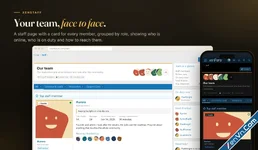
A team page of flip cards members come back to, and a private staff inbox your team answers in one click.
The staff page is the first place a new member goes to work out who runs the forum, and the next thing they want is a way to reach the right person without posting in public. XenStaff gives your team a page members actually open, with a card for every staff member, and a private inbox where staff answer in one click.
What it does
- A team page worth opening. Your staff groups in the order you choose, tabs to filter by role, a top staff member, and a sidebar with who is online, who is on duty now, who was thanked most and who to contact.
- Cards that flip. The front shows a large avatar, the staff badge, years of service, presence and title. The back holds messages, reaction score, trophies, quote, bio, office hours, social links and the actions: profile, contact, stats and thanks.
- Office hours in the visitor's time zone, with a note per slot, an "On duty now" badge, and slots past midnight shown on the right day.
- A private staff inbox. Members and guests write to a staff member straight from the card. The message lands in that person's account area with an alert, under Open, Replied and Closed tabs.
- Reply in one click. Your answer becomes a direct message to the member, their message quoted at the top, or an email to a guest who left an address. Reply times are measured and shown on the page.
- Closed to bots. A captcha for guests, XenForo's spam check, permissions for guests and anonymous messages, flood control and an hourly limit.
- Thanks that mean something. One click to thank, a second to take it back, an alert for the staff member and a 30-day chart on each stats page.
- A career timeline for each staff member: joined, promoted, paused, returned, milestones and your own events, shown on their profile.
- Part of your forum. A Staff tab on member profiles, the staff badge under the user title in messages and the member tooltip, Most thanked staff in Notable members, and a widget in three styles.
- For admins. A staff overview, a sheet for every staff member, a contact log, a badge library with icons or images, statistics, a rebuild tool, an admin permission and a read-only REST API.

Attachments


