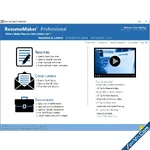
Build a Professional Resume Fast! ResumeMaker’s step-by-step guide will help you create a professional resume that showcases your experience, skills and capabilities to apply for positions and share on social media networks to get a better job.
ResumeMaker’s step-by-step guide will help you create a professional resume that showcases your experience, skills and capabilities to apply for positions and share on social media networks to get a better job.
5 Easy Ways to Create a Professional Resume
1. Step-by-Step Resume Guide
Your answers to easy questions are transformed into the perfect resume. Add, change, or delete at any time.
2. Start with a Professional Sample Resume
Select a professionally-written resume from 1,250 samples for nearly every career. Customize it with your own information to create a quality resume!
3. Quick & Easy Resumes
Create a resume by selecting phrases from 14,000+ job types. Customize by selecting the resume phrases that describe your experience. It’s that easy!
4. Resumes Created in ResumeMaker
Open a previously saved resume in ResumeMaker and use a copy to quickly edit. Then choose from powerful phrases, words, and expert advice to enhance your resume.
5. Import Your Resume from Word
Import a resume from Word and edit and update the content using the Resume Editor. Choose from powerful phrases, words, and expert advice to enhance your resume. Then apply the resume style that reflects your unique qualifications and experience.
Download ResumeMaker Professional Deluxe - Professional Resume Fast:
dl.xenvn.com
Password: xenvn.com
CyberLink AudioDirector Ultra 2027 - Full Active
17.0.6908.9
4K Software 4K Downloader
6.5.18