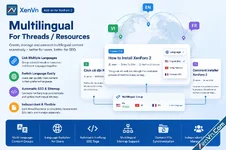
Multilingual for Threads / Resources is a powerful feature of the XenVn Add-on for XenForo 2 that makes it easy to organize and manage multilingual content on your XenForo forum.
With this feature, you can link multiple threads or resources written in different languages into a single multilingual content group. This allows users and search engines to understand that different URLs represent different language versions of the same content.
Create Multilingual Groups
You can link related threads or resources together to create a multilingual group.
For example, you may have:
- English: How to Install XenForo
- Vietnamese: Cách cài đặt XenForo
- French: Comment installer XenForo
Each thread or resource can be assigned or changed to the appropriate language at any time.
Independent Content for Each Language
Although threads and resources are linked together as a multilingual group, each thread or resource remains completely independent.
You can edit, update, moderate, and manage each language version separately without affecting the other versions.
This is especially useful for multilingual discussions and replies.
For example, an English thread can have its own English replies, while the Vietnamese version can have a completely different set of Vietnamese replies. Users can participate in discussions in their preferred language without mixing conversations across different language versions.
This approach gives you greater flexibility when managing multilingual communities while still allowing XenVn to maintain the relationship between the different language versions for navigation and SEO.
Independent Discussions
The multilingual relationship only connects the corresponding content versions. It does not force their posts, replies, or content to be identical.
You can therefore:
- Edit each language version independently.
- Add or remove content independently.
- Moderate each discussion separately.
- Allow users to reply in the language appropriate for that thread.
- Maintain completely different discussions for different language communities.
Easily Switch Between Languages
Once multilingual versions have been linked together, XenVn provides a language selection button on the thread or resource page.
Users can simply select the language they want to read and XenVn will take them directly to the corresponding version.
This provides a more convenient experience for multilingual communities and makes it much easier to navigate between translated versions of the same content.
Automatic Multilingual SEO
XenVn automatically generates the appropriate multilingual SEO tags for your content, including:
<link rel="alternate" hreflang="en" href="..." />
<link rel="alternate" hreflang="vi" href="..." />
<link rel="alternate" hreflang="fr" href="..." />
These hreflang annotations help search engines understand the relationship between different language versions of your content.
This can help search engines serve the appropriate language version to users based on their language and regional settings.
Multilingual Sitemap Support
XenVn also automatically updates the sitemap to support your multilingual content.
When threads or resources are linked into a multilingual group, their language relationships can be reflected in the sitemap, helping search engines discover and understand your multilingual URLs more effectively.
Main Language of Each Multilingual Group
Each multilingual group has a primary language.
By default, XenVn automatically selects the primary language based on your forum's default language configured at:
Admin → Appearance → LanguagesFor example, if your forum's default language is English, newly created multilingual groups will use English as their primary language by default.
This makes multilingual content management simpler while still allowing you to customize the language configuration when necessary.
Optional File Synchronization
XenVn also provides an option to synchronize files from the main content to other language versions.
When enabled, files attached to the first post of the main thread can be synchronized to its other language versions.
For resources, the files associated with the main resource can also be synchronized to the other language versions.
This is particularly useful when different language versions share the same downloadable files, images, documents, or other attachments.
You can choose whether to enable this synchronization according to the requirements of your multilingual content.
Designed for Multilingual XenForo Communities
The Multilingual for Threads / Resources feature is designed to make multilingual content management much more straightforward.
Instead of manually managing language relationships, SEO tags, sitemap information, and language navigation for every translated page, XenVn brings these functions together into a single system.
Key Features
- Create multilingual groups for related threads or resources.
- Link multiple language versions of the same content together.
- Assign or change the language of each thread or resource.
- Automatically generate hreflang SEO tags.
- Automatically update the multilingual sitemap.
- Provide a language selection button for users.
- Define a primary language for each multilingual group.
- Automatically use the forum's default language as the initial primary language.
- Optionally synchronize attachments/files from the main thread's first post or main resource to other language versions.
It will be available in XenVn version 2.6.0+.
You can view the demo right here in this thread.
Attachments
Last edited: