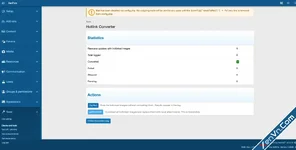
Hotlink Converter is an admin tool that batch-converts externally hotlinked images in XFRM resource descriptions into locally-stored XenForo attachments. It scans
[IMG]https://external.com/pic.jpg[/IMG] BB code tags, downloads the images, creates proper XF attachments, and replaces the BB code with [ATTACH=full]id[/ATTACH].Built as a one-time migration tool for forums with legacy resource content that hotlinks images from external hosts that may go offline at any time.
Key Features
- Admin Dashboard - Shows how many resource updates contain hotlinked images, conversion statistics (converted/failed/skipped/pending), and action buttons.
- Dry Run Mode - Preview what will be converted without downloading anything. Results appear in the conversion log as "pending" entries.
- Live Conversion - Downloads external images, creates XF attachments, and replaces tags with [ATTACH=full] tags. Runs as a resumable background job.
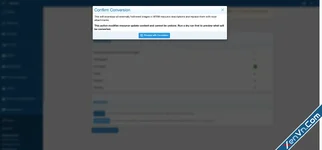
[*]Confirmation Overlay - Live conversion requires explicit confirmation since it modifies resource content irreversibly.
[*]Conversion Log - Paginated log of every URL processed, with status badges, attachment links, file sizes, error messages, and timestamps. Filterable by status.
[*]Smart Handling - Handles all [IMG] tag variants ([IMG width="400" height="300"], [IMG alt="desc"], etc.).
[*]URL Deduplication - If the same external URL appears multiple times in one resource update, it's downloaded once and all instances share the same attachment.
[*]Local URL Skipping - URLs pointing to your own board are automatically skipped.
[*]Idempotent - Safe to re-run. Already-converted URLs are skipped on subsequent runs. No duplicate downloads or attachments.
[*]Failure Resilience - Failed downloads (404s, timeouts, invalid images) are logged with specific error messages. The job continues processing remaining URLs.
[*]Clean Uninstall - Drops the conversion log table on uninstall.
[/LIST]
[B]How It Works[/B]
[LIST]
[*]Navigate to AdminCP > Tools > Hotlink Converter
[*]Review the dashboard - See how many resource updates contain external [IMG] tags
[*]Run a Dry Run - Click "Dry Run" to scan without converting. Check the log to see what would be processed.
[*]Convert All - Click "Convert All", confirm in the overlay, and the background job handles the rest. It downloads each image, creates an XF attachment, and updates the resource description.
[*]Check the Log - Review the conversion log for any failures. Filter by status to focus on issues.
[/LIST]
[ATTACH type="full"]21289[/ATTACH]

Attachments
![[OGRU] DataTables BB Code converter - Xenforo 2](https://xenvn.com/data/attachments/5/5045-de407f73f6f7f98a9966fcfd15a2102d.jpg?hash=3kB_c_b3-Y)

![[BS] Live forum statistics - Xenforo 2](https://xenvn.com/data/attachments/2/2028-db6cb7fe4cbe91dce4e00025ee548042.jpg?hash=22y3_ky-kd)
![[XenGenTr] Forum statistics system - Xenforo 2](https://xenvn.com/data/attachments/1/1931-c1da4ab67fa009997484c4b70f628a08.jpg?hash=wdpKtn-gCZ)