W

Error when update XenVn 2.5.0

writetrendy

Active Member

Vip Member
Reputation: 4%
Joined
15/7/23
Messages
30
Hello
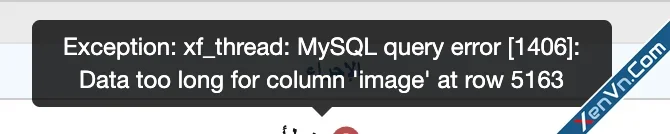
I tried to update XenVn from 2.4.2 to the latest version (XenVn-2.5.0-public), but I got this error
HTML:
You must log in to view
(51 lines)


May I know what the problem is and how I can fix it?
Thank you.

 

Attachments

Hello
I tried to update XenVn from 2.4.2 to the latest version (XenVn-2.5.0-public), but I got this error
HTML:
You must log in to view
(1 lines)


May I know what the problem is and how I can fix it?
Thank you.
Where did you get this error?

MySQL Error [1406]: This means that the data you are trying to insert into the image column exceeds the maximum size allowed by the type of this column.
 
Where did you get this error?

MySQL Error [1406]: This means that the data you are trying to insert into the image column exceeds the maximum size allowed by the type of this column.
I got it now after trying to update the addon.
What is the solution now?
 
@writetrendy
Has the upgrade to 2.5.0 been completed?

Try going to: Tools -> Rebuild caches -> [XenVn] Rebuild Data -> Select Rebuild Threads / Resources Metadata -> Run it.
 
@writetrendy
Has the upgrade to 2.5.0 been completed?

Try going to: Tools -> Rebuild caches -> [XenVn] Rebuild Data -> Select Rebuild Threads / Resources Metadata -> Run it.
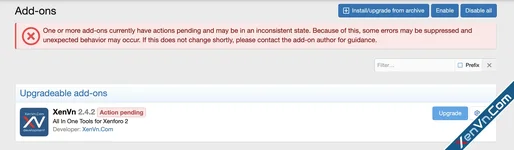
No, not completed
see the attached photo
 

Attachments

  • Screenshot 2026-01-13 at 1.14.09 AM.webp
    Screenshot 2026-01-13 at 1.14.09 AM.webp
    38.1 KB · Views: 0
@writetrendy
Has the upgrade to 2.5.0 been completed?

Try going to: Tools -> Rebuild caches -> [XenVn] Rebuild Data -> Select Rebuild Threads / Resources Metadata -> Run it.
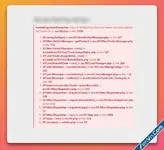
I got this error when I did the rebuild data

Error: Call to undefined method XenConcept\UserActivity\XF\Entity\Thread::setImage() in src/addons/XV/Job/Tools/MetaData.php at line 15
  1. XV\Job\Tools\MetaData->rebuildById() in src/XF/Job/AbstractRebuildJob.php at line 42
  2. XF\Job\AbstractRebuildJob->run() in src/addons/XV/Job/RebuildData.php at line 32
  3. XV\Job\RebuildData->run() in src/XF/Job/Manager.php at line 275
  4. XF\Job\Manager->runJobInternal() in src/XF/Job/Manager.php at line 205
  5. XF\Job\Manager->runJobEntry() in src/XF/Job/Manager.php at line 121
  6. XF\Job\Manager->runByIds() in src/XF/Admin/Controller/ToolsController.php at line 146
  7. XF\Admin\Controller\ToolsController->actionRunJob() in src/XF/Mvc/Dispatcher.php at line 362
  8. XF\Mvc\Dispatcher->dispatchClass() in src/XF/Mvc/Dispatcher.php at line 264
  9. XF\Mvc\Dispatcher->dispatchFromMatch() in src/XF/Mvc/Dispatcher.php at line 121
  10. XF\Mvc\Dispatcher->dispatchLoop() in src/XF/Mvc/Dispatcher.php at line 63
  11. XF\Mvc\Dispatcher->run() in src/XF/App.php at line 2824
  12. XF\App->run() in src/XF.php at line 806
  13. XF::runApp() in admin.php at line 15
 
@writetrendy
Open file XV/Setup.php
Find all:
$table->changeColumn('image', 'varchar', 500)->setDefault('');
Replace with:
$table->changeColumn('image', 'varchar', 1000)->setDefault('');
And try upgrade again.
 
@writetrendy
Open file XV/Setup.php
Find all:
$table->changeColumn('image', 'varchar', 500)->setDefault('');
Replace with:
$table->changeColumn('image', 'varchar', 1000)->setDefault('');
And try upgrade again.
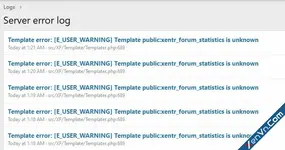
same issue, thank you for trying to help me
 
CleanShot 2026-01-13 at 01.26.23@2x.webp
 
Similar content Most view View more
Back
Top Bottom