Add-ons
Xenforo Add-ons
![[OzzModz] Admin Notes In ACP - Xenforo 2](https://xenvn.com/data/attachments/9/9915-325b33413b66a35bfa996cd0182c78ef.jpg)
Small addon that allows you to add notes in the ACP on the index page. Good for keeping track of things.

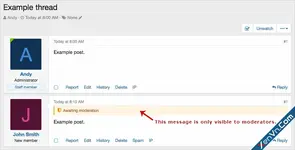
Description: Remove moderated post notice for post author. This add-on allows moderators to "Unapprove post" without alerting the post author, the post author will assume their post is still...
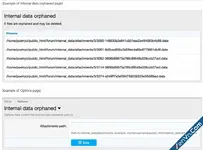
Description: Checks for orphaned internal data attachment files. How to use: Add 'internaldataorphaned' to your forum URL. Questions and answers: Q: Who can run this add-on? A: Only the admin can...
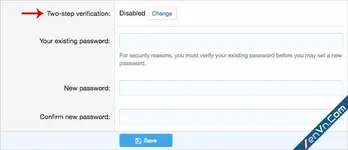
Description: Removes the Two-step verification option. Visitor tab -> Password and security Installation: Download Andy-RemoveTwoStepVerification-1.0.zip and unzip it. Copy the...
![[OzzModz] Content Badges: DBTech Credits Integration](https://xenvn.com/data/attachments/9/9883-1a059ac97566a213604d389019674060.jpg)
Requirements: XenForo 2.2.0+ [OzzModz] Content Badges DragonByte Credits 5.7.7+ Description: Provides integration with [DBTech] Credits to [OzzModz] Content Badges add-on Features: Support for...
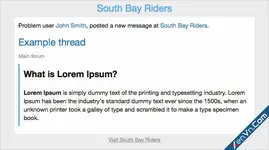
Description: When a problem user makes a new thread or post, staff gets an email.
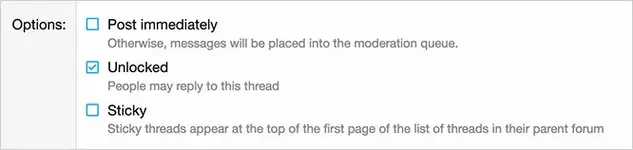
Description: Changes approval queue to physically delete threads. This add-on is useful when using the RSS feed importer with the Post immediately option deselected. This allows the admin to...
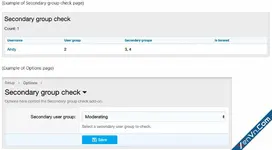
Description: Allows selecting secondary user group and shows associated settings. Features: All phrases start with secondarygroupcheck_ for your convenience. How to use: Add 'secondarygroupcheck'...
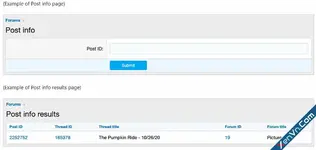
Description: Shows information on post ID entered. Features: All phrases start with postinfo_ for your convenience. How to use: Add 'postinfo' to your forum URL in your browser and click enter...
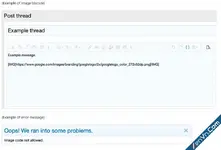
Description: Disallows image bbcode tag in posts. Features: All phrases start with disallowimagebbcode_ for your convenience.
![[OzzModz] XFRM: Category Select Dropdown - Xenforo 2](https://xenvn.com/data/attachments/6/6521-d8e839f1f2094d8ea231b1642a345514.jpg)
Description: Replaces category list with dropdown selection menu for resource add category chooser
![[OzzModz] Create Poll Thread Permissions- Xenforo 2](https://xenvn.com/data/attachments/3/3582-3a98cecd639c114a854876081050b316.jpg)
This small addon will give you the ability to set which usergroups can create poll type threads, This is useful for sites that allow multiple thread types in forums. You can find the permission "...

Description: Rebuilds post reactions cache. This add-on is useful to remove deleted members reactions. Features: Can be run from ACP or as CLI. All phrases start with rebuildpostreactionscache_...
![[OzzModz] Force HTTPS Images - Xenforo 2](https://xenvn.com/data/attachments/9/9861-82a4cc275649260cef2ee9ee3f9bdf64.jpg)
This add-on forces users to only attach images that come from a secure, HTTPS connection. If there is an image being attached (using - IMG BB Code) that is not from an HTTPS connection, an error...
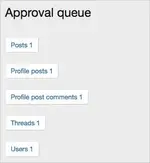
Description: Adds a menu to the approval queue. With this add-on you can manage each content type individually.
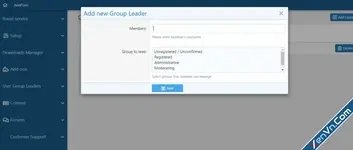
User Group Legend is an addon for XenForo bulletin board software that extends it's functionality and displays groups on forum home page. Feature Summary: List members of the groups Leader of the...

Description: Creates a conversation when a members account upgrade has expired. This add-on runs once immediately after the members account upgrade has expired. Features: Conversations are created...
![[TG] Verified Badge - Xenforo 2](https://xenvn.com/data/attachments/9/9844-8c77ed4690f48a88f7d96dc3d59376ec.jpg)
The plugin allows you to assign an FA icon to a group of users ... Works in topics, correspondence, user profiles and tooltips ... The color of the icon adjusts to the color of the user nickname ...
![[Liam W.] Title Permission Strings - Xenforo 2](https://xenvn.com/data/attachments/9/9837-2c28d7390facb91be019548a26278b84.jpg?hash=LCjXOQ-suR)
Description : This powerful add-on allows you to create 'Title permission strings', which, when included in a thread title, limit access to that thread based on the user criteria system. The...
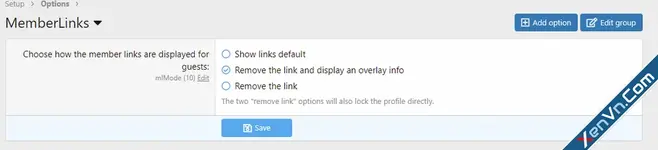
With this add-on you can completely remove the member links for guests + an option of a ToolTip overlay with further info. Simple but effective.