Correct day names for your timestamps
XQ Timestamp Fix is a lightweight workaround for a long-standing XenForo bug that can display an incorrect day name when the visitor’s browser time zone differs from the time zone XenForo uses to display dates.
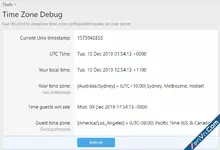
The issue was reported in January 2021 and again in November 2022. It remains reproducible in XenForo 2.3.13, more than five years after the original report:
What goes wrong?
XenForo initially produces the correct date and time through PHP. Its JavaScript date updater can then calculate the day name using the browser’s time zone while keeping the clock time formatted for the guest or member’s display time zone.
The result combines parts of two different local dates into one misleading timestamp.
For example, the same post could appear as:
When viewed on Tuesday afternoon, “Yesterday at 12:14 AM” means early Monday morning in Mountain time. The equivalent Pacific time is late Sunday night, not Monday night.
Even a one-hour time zone difference can therefore produce a whole-day error in the displayed day name. In this example, the incorrect guest label makes the post appear to have been made 24 hours later than its correct Pacific date and time.
At extreme time zone offsets on opposite sides of the International Date Line, the calendar dates can differ by two days, allowing an apparent discrepancy of up to 48 hours in the day-and-time label.
The stored timestamp is not changed. The full date shown in the hover tooltip remains correct. This is a display bug, but it can make the timing and order of conversations confusing.
Who can encounter it?
Different time zones do not always cause an error. The problem appears when those zones place the post on different calendar dates and XenForo displays a named day such as Sunday or Monday.
What this add-on does
XQ Timestamp Fix preserves the correct day-name timestamps produced by XenForo’s PHP renderer and prevents JavaScript from overwriting them.
It targets XenForo’s named-day range, normally posts from two through six calendar days ago. All seven day names are covered, including Saturday and Sunday.
XQ Timestamp Fix is a lightweight workaround for a long-standing XenForo bug that can display an incorrect day name when the visitor’s browser time zone differs from the time zone XenForo uses to display dates.
The issue was reported in January 2021 and again in November 2022. It remains reproducible in XenForo 2.3.13, more than five years after the original report:
What goes wrong?
XenForo initially produces the correct date and time through PHP. Its JavaScript date updater can then calculate the day name using the browser’s time zone while keeping the clock time formatted for the guest or member’s display time zone.
The result combines parts of two different local dates into one misleading timestamp.
For example, the same post could appear as:
- Logged-in member using Mountain time: Yesterday at 12:14 AM.
- Guest using the forum’s Pacific time setting: Monday at 11:14 PM.
- Correct guest timestamp: Sunday at 11:14 PM.
When viewed on Tuesday afternoon, “Yesterday at 12:14 AM” means early Monday morning in Mountain time. The equivalent Pacific time is late Sunday night, not Monday night.
Even a one-hour time zone difference can therefore produce a whole-day error in the displayed day name. In this example, the incorrect guest label makes the post appear to have been made 24 hours later than its correct Pacific date and time.
At extreme time zone offsets on opposite sides of the International Date Line, the calendar dates can differ by two days, allowing an apparent discrepancy of up to 48 hours in the day-and-time label.
The stored timestamp is not changed. The full date shown in the hover tooltip remains correct. This is a display bug, but it can make the timing and order of conversations confusing.
Who can encounter it?
- Guests whose browser time zone differs from the configured Guests’ time zone.
- Registered members whose browser time zone differs from their account’s selected time zone.
Different time zones do not always cause an error. The problem appears when those zones place the post on different calendar dates and XenForo displays a named day such as Sunday or Monday.
What this add-on does
XQ Timestamp Fix preserves the correct day-name timestamps produced by XenForo’s PHP renderer and prevents JavaScript from overwriting them.
It targets XenForo’s named-day range, normally posts from two through six calendar days ago. All seven day names are covered, including Saturday and Sunday.
- Works for guests and registered members.
- Uses XenForo’s existing time zone and calendar calculations.
- Preserves the timestamp’s visible text, full-date tooltip, styling, and machine-readable date.
- Leaves other timestamp ranges under XenForo’s normal live-update behavior.
- Requires no configuration.
- Adds no JavaScript, template modifications, external dependencies, scheduled tasks, or custom database tables.
- Makes no changes to stored timestamps or user time zone settings.
- Includes file-health hashes.
Attachments