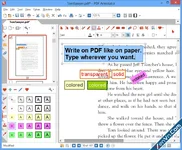
PDF Annotator is a powerful, specialized software designed for Windows that allows users to add comments, notes, corrections, and drawings directly onto any PDF document.
Unlike standard PDF readers, it focuses heavily on giving users a natural, paper-like editing experience, making it a favorite tool for students, teachers, project managers, and digital professionals.
Key Features:
- Freehand Annotating: You can write, draw, or sketch directly on PDFs using a digital pen, stylus, or mouse.
- Rich Text Tools: Add typed comments, text boxes, sticky notes, and callouts easily.
- Visual Enhancements: Highlight key sentences, underline text, and use digital stamps (like "Approved" or "Draft") to mark documents.
- Document Editing: Insert blank pages, delete unnecessary pages, crop margins, or rearrange the page order within the software.
- Form Filling: Easily fill out, sign, and return PDF forms without needing to print them out.
- Presentation Mode: Turn your PC or tablet into a digital whiteboard to deliver presentations or lectures directly from a PDF file.
- For Teachers & Professors: Grading student essays, marking up exam papers, and conducting interactive online lectures.
- For Students: Taking handwritten notes directly on digital textbooks, lecture slides, and research papers.
- For Business Professionals: Reviewing contracts, signing agreements, and adding feedback to architectural blueprints or project proposals.
Download PDF Annotator - PDF Editor & Annotation Software for Windows:
dl.xenvn.com
Password: xenvn.com
Last edited: