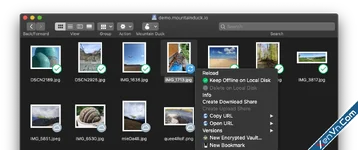
Mountain Duck is a powerful desktop application that allows you to mount cloud storage and remote servers as local disks in your operating system's file manager (Finder on macOS or File Explorer on Windows).
Mountain Duck bridges the gap between local storage and cloud services. Instead of using web interfaces or syncing massive amounts of data to your local hard drive, Mountain Duck lets you browse and open remote files exactly as if they were stored on your computer. It is developed by iterate GmbH, the same team behind the popular open-source file transfer client, Cyberduck.
Key Features
- Seamless Integration: It integrates directly into the Windows File Explorer and macOS Finder. You can open, edit, and save files using any local application (like Microsoft Word, Adobe Photoshop, or VS Code) directly to the cloud.
- Smart Synchronization (Cache Support):
- Offline Mode: You can select specific files or folders to be "always available offline." You can work on them without an internet connection, and the software will automatically sync your changes once you reconnect.
- On-Demand Loading: Files are only downloaded when you open them, saving massive amounts of local disk space.
- Extensive Protocol Support: It connects to almost any major storage provider, including:
- Cloud Services: Amazon S3, Google Drive, Dropbox, OneDrive, Box, Backblaze B2, OpenStack Swift.
- Remote Servers: FTP, SFTP, WebDAV, Microsoft Azure, and Google Cloud Storage.
- Cryptomator Encryption: Mountain Duck features built-in support for Cryptomator vaults. This allows you to encrypt your data client-side before it uploaded to the cloud, ensuring maximum privacy and security.
- Background Uploads: Whenever you save a file, it uploads in the background. A small progress icon in the menu bar or taskbar keeps you updated on the sync status.
Download Mountain Duck - Cyberduck for mounting volumes in the file explorer:
dl.xenvn.com
Password: xenvn.com