![[MC] Bypass Admin Login 1.0.1](https://xenvn.com/data/attachments/22/22830-dab3e80074dad53572560c821aea43a2.jpg)
2.22.3
Additional requirements Development mode enabled
License Do not redistribute
Visible branding No
This is a tool I have been using because I find it annoying to have to login to the Admin CP repeatedly on my local installations. As per the title, this add-on will allow you to be automatically signed in to the admin control panel under configured conditions.
Never run this in production. This add-on signs you into the Admin control panel without a password. Use it only on a local, single-user development install. Do not enable it on any server others can reach, or on any install holding real member data.
Features
Automatically signs you in to your admin control panel, completely bypassing the login panel.
Multiple security requirements are enforced for this to run properly:
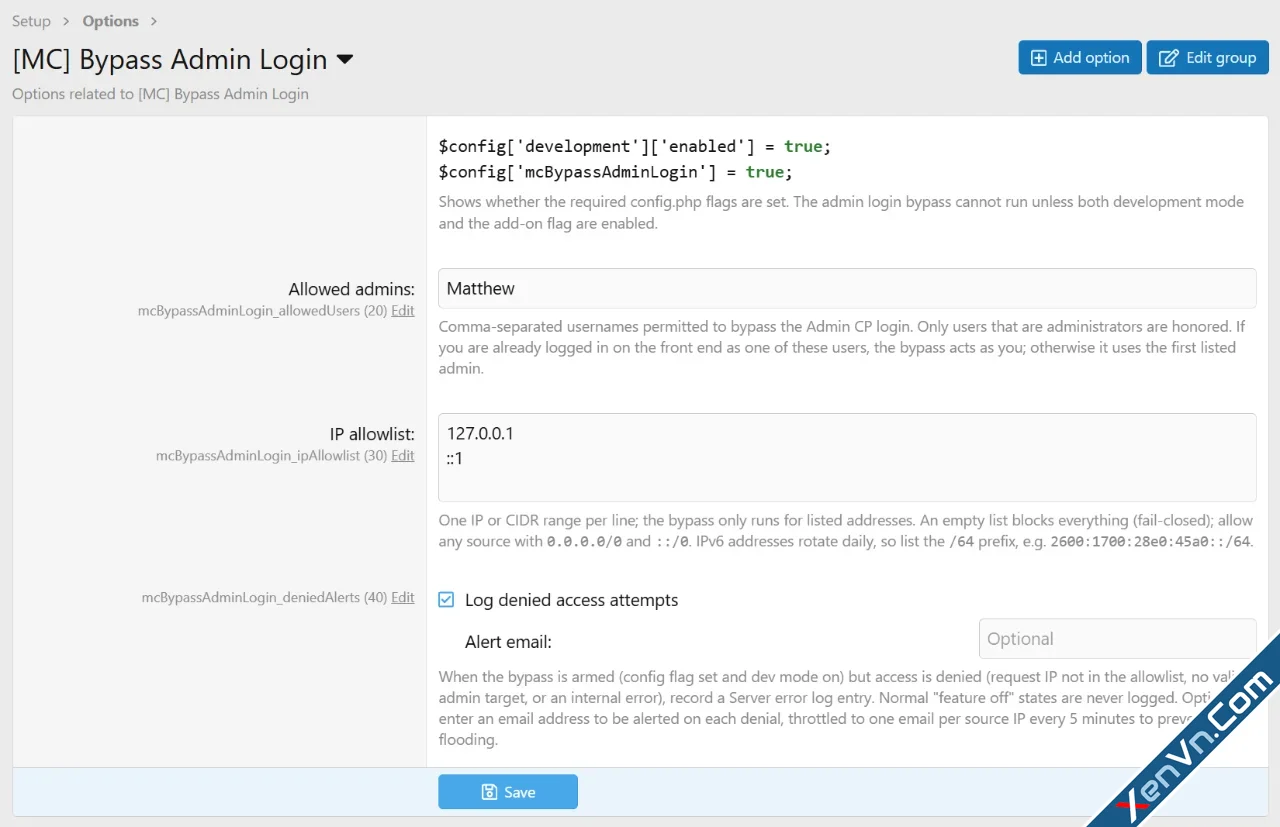
Development mode is a requirement. $config['development']['enabled'] = true;
Our specific config flag must also be enabled. $config['mcBypassAdminLogin'] = true;
Your username must be added to the allowed admins list.
Your IP Address must be configured, unless you explicitly allow any source.
Optionally log denied login attempts. This is useful if you choose to use this on a live private and directory locked development installation. It also helps diagnose any failed login attempts due to any IP address issues.
Includes optional email alerts as well.
IP address tips:
127.0.0.1 and ::1 are default for local installs.
IPv6 addresses should include it's /64 prefix since v6 addresses can rotate on a daily bases:
Example: 2600:1700:28e0:45a0:dc65:ed44:5c30:2d37 to 2600:1700:28e0:45a0::/64
To allow any source, you must EXPLICITLY type in 0.0.0.0/0 and ::/0
Additional requirements Development mode enabled
License Do not redistribute
Visible branding No
This is a tool I have been using because I find it annoying to have to login to the Admin CP repeatedly on my local installations. As per the title, this add-on will allow you to be automatically signed in to the admin control panel under configured conditions.
Never run this in production. This add-on signs you into the Admin control panel without a password. Use it only on a local, single-user development install. Do not enable it on any server others can reach, or on any install holding real member data.
Features
Automatically signs you in to your admin control panel, completely bypassing the login panel.
Multiple security requirements are enforced for this to run properly:
Development mode is a requirement. $config['development']['enabled'] = true;
Our specific config flag must also be enabled. $config['mcBypassAdminLogin'] = true;
Your username must be added to the allowed admins list.
Your IP Address must be configured, unless you explicitly allow any source.
Optionally log denied login attempts. This is useful if you choose to use this on a live private and directory locked development installation. It also helps diagnose any failed login attempts due to any IP address issues.
Includes optional email alerts as well.
IP address tips:
127.0.0.1 and ::1 are default for local installs.
IPv6 addresses should include it's /64 prefix since v6 addresses can rotate on a daily bases:
Example: 2600:1700:28e0:45a0:dc65:ed44:5c30:2d37 to 2600:1700:28e0:45a0::/64
To allow any source, you must EXPLICITLY type in 0.0.0.0/0 and ::/0
![[FF] Login Spaminator Admin Area Logs - Xenforo 2](https://xenvn.com/data/attachments/10/10579-344ff58034060baedb0bfaaf38967275.jpg)
Attachments
![[XenConcept] Login As User - Xenforo 2](https://xenvn.com/data/attachments/0/266-29c48673f42352af7e07bab994f3748f.jpg)
![[cXF] Login or Register on thread view - Xenforo 2](https://xenvn.com/data/attachments/5/5251-71e158e4edef3c595f62fb8abb0f3f23.jpg)
![[cXF] Login Widget - Xenforo 2](https://xenvn.com/data/attachments/4/4013-f79068fb9b2d4012b48c52f11cd91eb8.jpg?hash=95Bo-5stQB)
![[DimmmCom] AdminCP Style - Xenforo 2](https://xenvn.com/data/attachments/4/4117-8214f76b1c9302059209791e15f4767a.jpg)
![[XenConcept] Captcha login - Xenforo 2](https://xenvn.com/data/attachments/6/6596-ac708c9ab946a5637b68b9815098b23d.jpg)