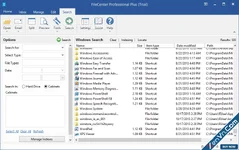
Lucion FileCenter Suite (commonly known as FileCenter DMS) is a comprehensive document management system designed for Windows. It helps small to medium businesses, professionals, and individuals digitize paper files, organize electronic documents, and transition to a paperless office.
The most unique feature of FileCenter is that it does not use a complex, proprietary database. Instead, it overlays directly onto your existing Windows file structure. This ensures you never experience vendor lock-in; your files remain standard Windows files and folders that you can access even without the software.
🛠 Core Key Features
- Electronic Filing Cabinets: It organizes standard Windows folders into an intuitive, visual layout resembling real-world file cabinets, drawers, and folders.
- One-Click OCR Scanning: Built-in optical character recognition turns scanned paper documents into searchable, text-selectable PDF files instantly.
- Integrated PDF Editor: Users can edit text, add annotations, split/merge pages, and sign PDFs directly inside the app without buying Adobe Acrobat.
- Advanced File Naming: It features reusable naming templates to enforce consistent file naming rules across your entire organization automatically.
- Cloud & Network Integration: It works seamlessly with local networks and popular cloud services like OneDrive, Google Drive, Dropbox, and SharePoint.
 Products in the Ecosystem
Lucion provides specialized tools within the FileCenter family to handle specific workflows:
- FileCenter DMS: The flagship application used for daily document management, scanning, and PDF editing.
- FileCenter Receipts: A dedicated tool for scanning receipts, automatically extracting financial data, and generating expense reports.
- FileCenter Automate: A server-based tool that watches folders to batch-convert large volumes of incoming files into searchable PDFs.
- FileCenter Portal: A secure, cloud-based client portal used for safely sharing and receiving sensitive documents with customers.
Download Lucion FileCenter Suite - Paperless Office Software for Any Office:
dl.xenvn.com
Password: xenvn.com