Hasleo WinToHDD is a practical, all-in-one Windows deployment utility developed by Hasleo Software. It allows users to install, reinstall, and clone Windows operating systems directly without needing a CD, DVD, or bootable USB drive.
Key Features
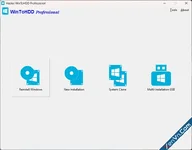
- Reinstall Windows. You can reinstall Windows directly from ISO, WIM, ESD, or VHD image files stored on your local hard drive.
- New Installation. The software lets you install a fresh copy of Windows onto a second hard drive or SSD without external installation media.
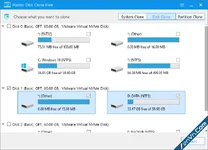
- System Clone. You can migrate your existing Windows installation, installed programs, and settings to a new HDD or SSD seamlessly.
- Multi-Installation USB. It includes a tool to create a single bootable USB flash drive capable of installing multiple versions of Windows on both BIOS and UEFI computers.
- Wide Compatibility. The program supports Windows Vista through Windows 11 and Windows Server, working smoothly with both GPT and UEFI partition styles.
- User-Friendly Interface. Its step-by-step wizard simplifies complex deployment tasks for everyday home users and IT technicians alike.
- Flexible Licensing. You can download a free edition for basic home use, or upgrade to Professional and Enterprise editions for advanced business features and faster cloning speeds.
Download Hasleo WinToHDD - Install, Reinstall, Clone Windows 10/11:
dl.xenvn.com
Password: xenvn.com