codeNET Style v1.0 — Modern XenForo Style
Style Introduction
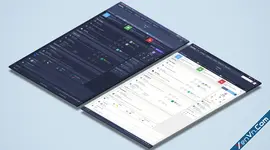
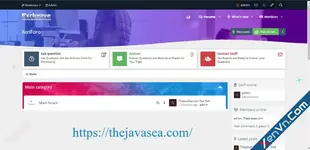
codeNET Style comes with a modern technology-inspired design focused on balanced colors and a comfortable UI/UX experience, with full support for Dark Mode.The style was designed to be lightweight and fully optimized for speed, performance, accessibility, and search engine requirements.
codeNET also provides integrated widgets that make forum management easier and help members navigate between recent topics and content more efficiently.
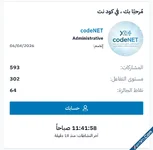
In addition, the style includes a dedicated Member Dashboard Widget, allowing members to easily access their account information and manage their profile.
Basic Style Information
[]Style Name: codeNET
[]Version: codeNET v1.0
[]Developed & Designed by: Mehdi Hameed — Technical Administrator of codeNET
[]Copyright: All rights reserved to codeNET Forum
Important: Removing the codeNET copyright will result in losing access to future style updates.
Style Speed & Performance
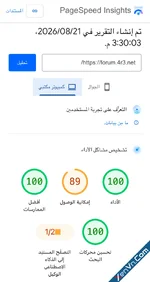
In today’s web environment, Google SEO and search engine performance standards are increasingly focused on website speed, performance, accessibility, and how efficiently search engine crawlers can access and index content.When developing codeNET Style, we focused on creating a smooth and efficient experience for both users and search engines.
The style is designed to make accessing content simple and fast, whether the content is newly published or older content that users and search engines need to discover.
Our goal was to provide a lightweight interface without sacrificing the visual experience or functionality of the forum.
Multiple Widgets & Forum Statistics
The integrated widgets make it easier for members to discover new content while also helping search engines reach recently published content more efficiently.Traditionally, creating a complete statistics and content widget system for XenForo forums may require several additional add-ons. This can make the setup more complicated, especially when some required add-ons are paid or difficult to find.
For this reason, we integrated the statistics widgets directly into the codeNET Style, allowing them to work as part of the style without requiring an additional add-on.
Adding the Widgets
Go to:Admin Control Panel → Appearance → Widgets
Click Add Widget and create the following widget:
Recent Posts
[]Widget Type: New Posts
[]Widget Key:codenet_a
Most Popular
[]Widget Type: Most Popular
[]Widget Key:codenet_b
Adding a Widget to a Specific Section
If you want to add another widget to a specific category, node, or forum section:
[]Go to Admin Control Panel → Appearance → Widgets.
[]Click Add Widget.
[]Select the widget type you want.
[]Give the widget the following key:codenet_c
Appearance → Templates
Searc for:
codenet_tabsAround line 72–73, you will find code similar to:
HTML:
You must log in to view
(1 lines)
HTML:
You must log in to view
(1 lines)Your Widget Name with the name you want to display.Then scroll down slightly until you find:
HTML:
You must log in to view
(3 lines)
HTML:
You must log in to view
(3 lines)Hiding the Widgets
If you do not want to display the integrated widgets, simply do not create widgets using the following keys:
[]codenet_a
[]codenet_b
Member Dashboard Widget
The Member Dashboard Widget provides members with a simple and convenient way to view important account statistics and quickly access their profile settings.It also adds a distinctive touch to the overall visual experience of the style while making the member area easier to use.
If you want to modify the widget, add additional statistics, or customize its content, go to:
Admin Control Panel → Appearance → Templates
Search for:
codeNET_member_widgetYou can then modify the template according to your requirements.
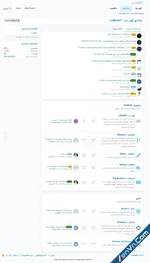
Style Preview
The preview demonstrates the overall appearance of codeNET Style, including its modern interface, widgets, member dashboard, and carefully balanced UI elements.
Technical Support & Updates
Development and maintenance of codeNET Style will continue, God willing, with ongoing reviews of reported issues, improvements, and new features.Future updates may include:
[]Visual improvements
[]New design elements
[]Performance optimizations
[]Bug fixes
[]Additional customization options
[]Improvements to the overall user experience
Technical support for the style will remain continuous and free of charge through the codeNET Forum.
We hope you enjoy codeNET Style and that it becomes a valuable addition to the XenForo style community.
Thank you for your support!
codeNET Style v1.0
Modern • Lightweight • Fast • User Friendly
Modern • Lightweight • Fast • User Friendly

Zenitho - Xenforo 2 Style
2.3.11
Attachments

![[XenGenTr] Style V11 - Xenforo 2 Style](https://xenvn.com/data/attachments/14/14879-3a7c3e779bed1726f92a9e88541ef3bc.jpg?hash=Onw-d5vtFy)