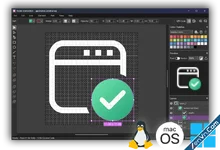
Axialis IconVectors is a lightweight, fast vector icon editor built for developers. Version 2.0 for Windows adds an integrated Icon Explorer for browsing and managing complete SVG folders, plus validated batch processing for palette, size, and stroke changes. Refine individual icons with the Colors panel, Element Library, SVG Properties, Pixel-Align Selection, Analyze/Clean Up Icon, and live code export to SVG, XAML, WPF Geometry, VectorDrawable, SwiftUI, React TS, Vue TS, and C++. Its local MCP integration now exposes 155 tools for the editor, Explorer, files, batches, rendering, and export.
- Lightweight Application: Very fast and responsive, it perfectly integrates into your development process to increase your productivity.
- Easy SVG Vector Icon Editing: Create and edit SVG icons swiftly.
- Developer-Oriented Design: Essential vector tools tailored specifically to developers.
- Integrated Icon Explorer: Browse, filter, organize, and open complete folders of SVG icons in a responsive thumbnail grid.
- Validated Batch Processing: Apply palettes, resize icons, or apply strokes across selected files with preflight counts, staged output, and rollback on failure.
- Redesigned Colors Panel: Work with palettes, HEX, RGB, HSL, quick colors, and recent colors; left-click applies Fill and right-click applies Stroke.
- SVG Fill Rules: Import, edit, and export Non-Zero and Even-Odd fill rules for compound paths and holes.
- Live Code Viewer: Real-time source code previews in SVG, minified SVG, SVG Symbol, XAML, WPF Geometry, VectorDrawable, SwiftUI, ReactTS, VueTS, and C++.
- Element Library: Insert ready-to-use SVG elements from disk-backed libraries and customize the library with your own SVG files.
- SVG Properties: Manage the editor canvas viewBox, output width and height, rendering options, and SVG metadata in one dialog.
- Pixel-Align Selection: Align selected artwork to the pixel grid with a one-click command and Control Bar button.
- Editor Hotkeys: Cycle line caps, cycle line joins, run pixel alignment, and temporarily switch between Selection and Path Editor tools from the canvas.
- Analyze/Clean Up Icon: Inspect the current icon for off-grid geometry, inconsistent strokes, hidden leftovers, empty groups, transform baggage, and unused defs before export.
- Auto Gradient: Turn a flat fill or stroke color into a same-tone linear or radial SVG gradient with adjustable angle and force.
- Dashed & Dotted Strokes: Apply non-destructive SVG stroke styles with solid, dotted, dash, long dash, rounded dash, and custom patterns.
- Fit Icon to Canvas: Resize the canvas around the artwork quickly when preparing icons for exact export sizes.
- Precise Zoom Workflow: Type exact zoom percentages, use the Set Zoom Level dialog, or drag a canvas area with the Zoom tool.
- Smart Centering: Center selected elements on the largest selected element for fast badge, overlay, and composition alignment.
- 155 MCP Tools: Connect Codex, Claude, VS Code Copilot, Cursor, Gemini CLI, Kiro, Cline, and GitHub Copilot CLI to the live editor, Explorer, file operations, batches, rendering, and export.
- Advanced Icon Tools: Add overlays, shadows, cutouts, and generate UI state color variants.
- Text Tool: Convert typed text into editable vector paths, one glyph per character.
- Palette Management: Manage swatches, add icon colors, and reuse brand palettes across icons.
- Preview Drag & Drop: Drag the preview to other apps for instant SVG export.
- Make Dark-Theme Icons: Colorize icons for dark theme in a click.
- Layer Management: Organize artwork through grouping, renaming, visibility controls, and per-layer lock toggles.
- Path Editing: Accurately manipulate anchor points, Bezier curves, and path conversions.
- Geometric Shapes: Create rectangles, ellipses, and polylines, convertible into editable paths.
- Boolean Operations: Perform vector logic operations such as union, subtract, intersect.
- Dark and Light UI Themes: Seamlessly integrates with your preferred OS theme.
- User-Friendly Interface: Features editable zoom, grids, snap-to-grid, canvas center, Focus Mode, and Auto-center Canvas.
- GPU Acceleration: Optional GPU rendering improves responsiveness on compatible systems.
- Multiple Instances Support: Open multiple windows simultaneously to streamline workflow.
- Shell Extension: Display SVG icons in thumbnails and previews (Windows version).
Attachments