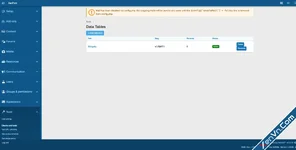
Data Tables lets administrators create stand-alone, fully customizable data tables within XenForo - no code required. Define your own columns, set up dropdown lookups, link records across tables, and manage structured data right from the AdminCP, with clean public-facing display pages wrapped in your forum's theme.
Perfect for product catalogs, game databases, team rosters, pricing tables, inventory lists, or any structured data that doesn't fit neatly into forum threads.
Key Features
- Dynamic Table Definitions - Create unlimited tables, each with its own title, URL slug, description, and display order. Toggle tables active/inactive without deleting data.
- Listed/Unlisted Tables - Hide definitions from the public table index while keeping them accessible via direct URL. "Unlisted" badge in AdminCP.
- 8 Field Types - Build columns using: Text, Number, URL, Date, Lookup (dropdown), Table Lookup (cross-table reference), Text Area, and Yes/No (boolean). Each field supports sortable and filterable flags.
- Field Visibility - Per-field "Show in table" toggle to hide columns from the table view while still showing them on record detail pages.
- Lookup Columns (Relational Dropdowns) - Define dropdown options for any field. Options are stored relationally (not as flat strings), enabling clean data entry and consistent display.
- Cross-Table Relational Lookups - Link records between tables with the Table Lookup field type. Select a linked table and a display field, and users pick from records in that table via dropdown. Values render as clickable links to the referenced record.
- Inline "Create New" Overlay - A "+" button next to every Table Lookup dropdown opens a modal to create a new record in the linked table. Saves via AJAX and auto-selects in the parent dropdown - no page reload, no navigating away. Works in both AdminCP and public pages.
- Friendly URLs - Records accessible at /data-tables/record/{table-slug}/{record-slug}/ with auto-generated unique slugs. Legacy URLs 301-redirect to the new format.
- Breadcrumbs - Full navigation trail on all public pages: Home > Data Tables > Table Name > Record Title.
- Clickable Table Rows - Click anywhere on a table row to navigate to the record detail page. Ctrl/Cmd+click opens in a new tab.
- Record Detail Pages - Each record has its own detail page showing all fields and a "Referenced by" section listing records from other tables that point to it.
- CSV Import - Upload CSV files from the AdminCP record list page. Supports comma, tab, semicolon, and pipe delimiters. Automatic column mapping by header name, 5-row preview, lookup resolution with optional auto-creation of missing options.
- CSV Export - Download table data as CSV with formatted cell values (lookup labels, boolean Yes/No, table lookup display labels).
- Inline Display Order Editing - Edit field display order values directly from the field list page without opening each field individually.
- FontAwesome Icon Picker - Choose a custom icon for each table definition from 1,500+ FontAwesome icons (e.g., fa-car, fa-wrench, fa-database). Icons appear on the table list, table view header, and record detail header.
- Enhanced Table List - Public table directory uses rich card rows with definition icon, description, field count, and record count badge with smooth hover transitions.
- Unified Page Headers - Table view and record detail pages share a consistent icon + title block header pattern for visual cohesion across all pages.
- Bulk Select & Delete - Admin record list has select-all checkbox and batch delete button with dynamic count display.
- Admin Record Management - Full CRUD for records within the AdminCP. Dynamic forms automatically adapt to your field definitions - text fields become text inputs, lookups become dropdowns, numbers get spinners, booleans get checkboxes.
- Public Table Display - Clean, responsive public pages at /data-tables/ showing all listed tables, with individual table views at /data-tables/{slug}/. Full theme integration.
- Column Sorting - Mark fields as "sortable" in the admin, and users can click column headers on the public table view to sort ascending/descending.
- Public Record Submission - Optionally allow members to submit new records from the public side (permission-controlled).
- Multi-Select Table Lookups - Table Lookup fields can be marked multi-select for many-to-many relationships. Rendered as a multi-select dropdown (or autocomplete tags for large lists). Cell display shows comma-separated linked items with clickable links.
- Public Edit/Delete - Record owners can edit and delete records from public pages. Controlled by dedicated permissions with sensible defaults (edit: Allow, delete: Deny).
- Required Field Validation - Mark fields as required. Enforced across all save actions (admin and public) with clear error messages.
- Autocomplete Search - Table Lookup fields with more than 50 options automatically switch from dropdown to AJAX autocomplete with debounced search and removable tag pills for multi-select.
- Inline Edit Linked Record - Pencil icon next to single-select Table Lookup fields opens an overlay to edit the referenced record. Option label refreshes on save without page reload.
- Permission-Controlled Access- Four permissions out of the box:
- View data tables (default: Allow for all)
- Add records (default: Deny)
- Edit records (default: Allow)
- Delete records (default: Deny)
- Pagination - Both admin and public views paginate at 50 records per page.
- AJAX Field Configuration - When editing fields, selecting "Table Lookup" dynamically shows linked table and display field dropdowns via AJAX - no page reload needed.
- Clickable URL Fields - URL-type field values render as clickable links in both admin and public table views.
- Clean Uninstall - All 5 database tables are dropped on uninstall. No leftover data.

![[XB] Post Comments - Xenforo 2](https://xenvn.com/data/attachments/20/20002-3fb9f90a467cdc47afe0c6a76fb2468b.jpg?hash=P-aabOZk2y)
Attachments
![[OGRU] DataTables BB Code converter - Xenforo 2](https://xenvn.com/data/attachments/5/5045-de407f73f6f7f98a9966fcfd15a2102d.jpg?hash=3kB_c_b3-Y)
![XF2 [8WR] Database Backup - Xenforo 2](https://xenvn.com/data/attachments/4/4463-ab5600a3fede9d264e5d1aec5cf3e9c0.jpg)