- Views: 2K
- Replies: 3
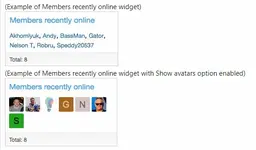
Displays a block containing members recently online.
Features:
All phrases start with membersrecentlyonline_ for your convenience.
Installation:
- Download Andy-MembersRecentlyOnline-1.7.zip and unzip it.
- Copy the src/addons/Andy/MembersRecentlyOnline directory to your server.
- From the Admin Control Panel Install the add-on.
- Admin Control Panel -> Appearance -> Widgets
- Widget definition = Members recently online
- Widget key = members_recently_online
- Title = (leave blank)
- Display in positions = Forum list: Sidebar
- Click Save.
Normally you will select Yes to the following User groups:
Registered
Unregistered / Unconfirmed
Questions and Answers:
Q: How can I reduce the number of members shown?
A: Adjust the Minutes in the Options page.
Q: Does this add-on honor the "Show your online status" in the users preferences?
A: Yes.
Q: How can I see those members which have "Show online status" disabled?
A: Set the Administrative group (View as admin) to Yes.
Q: Why are some usernames a lighter color?
A: Those are members which have "Show your online status" unchecked and you have View as admin permission.
Q: Why are some avatars have an opaque?
A: Those are members which have "Show your online status" unchecked and you have View as admin permission.
![[cXF] Hide profile page - Xenforo 2](https://xenvn.com/data/attachments/19/19201-9756a9a23ed1d27b6774b67552650bdb.jpg)
Attachments
Last edited: